Click Fraud Detection in Google Ads: 9 Signals and Steps (2026)
ClickTrust Research · · 10 min read · click fraud · google ads · click fraud detection · performance max · invalid clicks
TL;DR Click fraud detection in Google Ads means comparing what you were charged for with what actually arrived on your site, using nine signals you can read in standard reports. Google filters the invalid clicks it detects and shows the result in its Invalid traffic card, but it publishes no miss rate, so the clicks its filters let through are yours to find.

Key takeaways
- Google Ads Help defines invalid clicks as clicks that don't represent a genuine interest in your business and lists three types: accidental clicks, automated traffic and manual clicks.
- Google's Click Quality Form covers invalid clicks, poor-quality form submissions, clicks outside location targeting and sudden short-term cost increases, which map to four of the nine signals in this guide.
- The Invalid traffic card in Google Ads shows Estimated savings and Credited cost, and investigation requests cover activity within the last 60 days.
- TAG's Data Center IP list grew to nearly 68 million addresses in 2025, which is why data-center ranges in your server logs are the fastest signal to check.
- Imperva's Bad Bot Report 2026 found bots were more than 53% of web traffic in 2025, and Google blocked or removed more than 1.29 billion ads for Abusing the Ad Network in the same year.
- Microsoft's traffic-quality guidance treats CTR and conversion anomalies as significant only after about 10,000 impressions, a sensible threshold before acting on any single signal.
Click fraud detection in Google Ads is the process of comparing what Google charged you for with what actually arrived on your site, and isolating the clicks that no real customer made. You do not need special software to start. Nine signals in standard Google Ads and analytics reports will show you whether you have a problem, and how large it is.
This guide lists those nine signals, gives you a numbered audit procedure, explains what Google's own invalid-click reporting does and does not show, and tells you when a detection tool is worth it. If you need the background first, read what click fraud is.
What does click fraud detection in Google Ads involve?
It involves three comparisons: charged clicks against landing-page sessions, clicks against conversions, and your account against a benchmark. If Google billed 1,000 clicks and your analytics shows 700 sessions, the gap needs an explanation. If a campaign's clicks double while its conversions stay flat, the new clicks are suspect. If your invalid rate sits well above a published benchmark, something is wrong.
The benchmark is the hard part, because no platform publishes a miss rate. The closest industry reference comes from the Trustworthy Accountability Group (TAG). Invalid traffic held under 1% in TAG Certified Channels in the US for the fourth consecutive year, across 745 billion impressions, which TAG's chief executive calls "the industry standard benchmark of 1%" (TAG, US Ad Industry Extends Success in Fight Against Fraud). In unfiltered European video and display channels, TAG's 2025 European Ad Fraud Savings Report estimated 10.36% invalid traffic in 2023 (TAG, 2025 European Ad Fraud Savings Report). ClickTrust audits find 14 to 42 percent of paid traffic is invalid depending on channel.
Start from Google's own definition, because every signal below maps to it. Google Ads Help says: "Invalid clicks are clicks on your ads that don't represent a genuine interest in your business", and lists three types: "Accidental clicks" from poor ad placement, "Automated traffic" from bots or deceptive software, and "Manual clicks" that raise your costs or inflate publisher profits (Google, Invalid clicks: Definition, Google Ads Help).
What does Google's own invalid-click reporting show?
Google reports the invalid clicks it has already filtered and credited, not the ones it missed. The same help page states: "You won't be charged for invalid clicks or impressions." Clicks identified as invalid are filtered from campaign metrics and removed from billing, and if you were billed before detection you receive "a credit on your next invoice where appropriate and possible" (Google, Invalid clicks: Definition). The Invalid traffic card adds two metrics. Google defines "Estimated savings" as "The estimated cost saved by automated protections from invalid traffic" and "Credited cost" as "The amount credited back to you for past invalid activity detected after the billing period ended" (Google, About invalid traffic, Google Ads Help). For campaign-level detail, open the Invalid Activity Credit Report in Report Editor's template gallery. Its columns include "Credited clicks", "Credited amount" and "Adjusted cost", and the report "breaks these credits down by campaign and network" (Google, About the Invalid Activity Credit Report).
Treat all of this as a floor. It counts what Google found. The nine signals below are about what it did not.
9 signals of click fraud in Google Ads reports
Each signal is visible in Google Ads, Google Analytics or your server logs. One signal on its own is a prompt to look closer. Three or more together usually mean invalid traffic.
1. CTR spikes with no change in conversions
A sudden rise in clickthrough rate on a keyword or ad group, with conversions flat, is the oldest click-fraud signal. Real demand brings buyers. Bots and click farms bring clicks. Google's Click Quality Form explicitly accepts "sudden short-term cost increases" as grounds for an investigation (Google, About the Invalid Activity Credit Report).
Give the signal enough data first. Microsoft's traffic-quality guidance for its programmatic platform requires "at least 10,000 impressions on a given slice of inventory" before it treats CTR or conversion anomalies as significant (Microsoft, Microsoft Invest: Traffic Quality). The same discipline applies to a Google Ads ad group.
2. Repeated IP addresses and data-center ranges
Your web server logs or analytics will show the same IP address, or the same narrow range, hitting your landing page many times from paid campaigns. Google Ads does not show IP addresses, so you need your own logs or a tracking script. Data-center ranges are the strongest tell. TAG's Data Center IP list grew to nearly 68 million IP addresses in 2025 (TAG, 2025 TAG Analysis Shows Ad Industry Progress in Fighting Fraud).
3. Clicks at odd hours
Use the hour-of-day segment in Google Ads. A B2B account whose clicks cluster between 2 a.m. and 5 a.m. local time, with no matching conversions, is seeing automation or an offshore click farm. Compare the hourly conversion rate against the hourly click share.
4. Geographic mismatches
The user locations report shows where clicks came from. Clicks from countries outside your targeting, from one city with no customers, or from locations that do not match the user's language settings point to proxies or farms. Google's Click Quality Form lists "clicks outside location targeting" as a category you can ask it to investigate (Google, About the Invalid Activity Credit Report). Check that location targeting is set to "presence" rather than "presence or interest", which widens exposure.
5. Display, Video Partners and Search Partners placements
Placement is the largest driver of invalid traffic in most Google accounts. Two of Google's three invalid-click types live here: accidental clicks caused by poor ad placement, and manual clicks made to "inflate publisher profits" (Google, Invalid clicks: Definition). Run the placement report, sort by clicks, and look at bounce and conversion rates for the top twenty. Our Google supply page covers the inventory types in detail.
6. Performance Max and AI Max exposure
Automated campaign types widen the inventory you buy, and some of it is poor. Performance Max reaches placements you cannot exclude one by one, and AI Max expands Search matching beyond your keywords. Record the invalid click rate and click-to-session ratio before you enable either, measure again after a billing cycle, and treat any rise as a cost of the feature.
7. Bounce rate and time on page
Bots leave fast. Filter your analytics to paid traffic and look at sessions under two seconds, especially from Display and video placements. Real visitors who clicked a relevant ad rarely bounce instantly in large numbers. A placement with a 95% bounce rate and a one-second average session is a candidate for exclusion regardless of what it costs.
8. Device and browser patterns
Segment by device, operating system and browser. A campaign where one outdated browser version or one obscure device type drives a large share of clicks and no conversions is seeing automation. The MRC's definition of general invalid traffic names "non-browser user agent headers" as a list-based catch (Media Rating Council, Invalid Traffic Detection and Filtration Guidelines Addendum), and Microsoft says it keeps "a list of banned user agents" while admitting it "can't guarantee we're blocking all unsuitable agents" (Microsoft, Microsoft Invest: Traffic Quality).
The scale of non-human traffic makes this check worthwhile. By early December 2025, humans generated only 47% of HTML requests on Cloudflare-protected sites, with non-AI bots at 44% and AI bots averaging 4.2% across the year (Cloudflare, The 2025 Cloudflare Radar Year in Review).
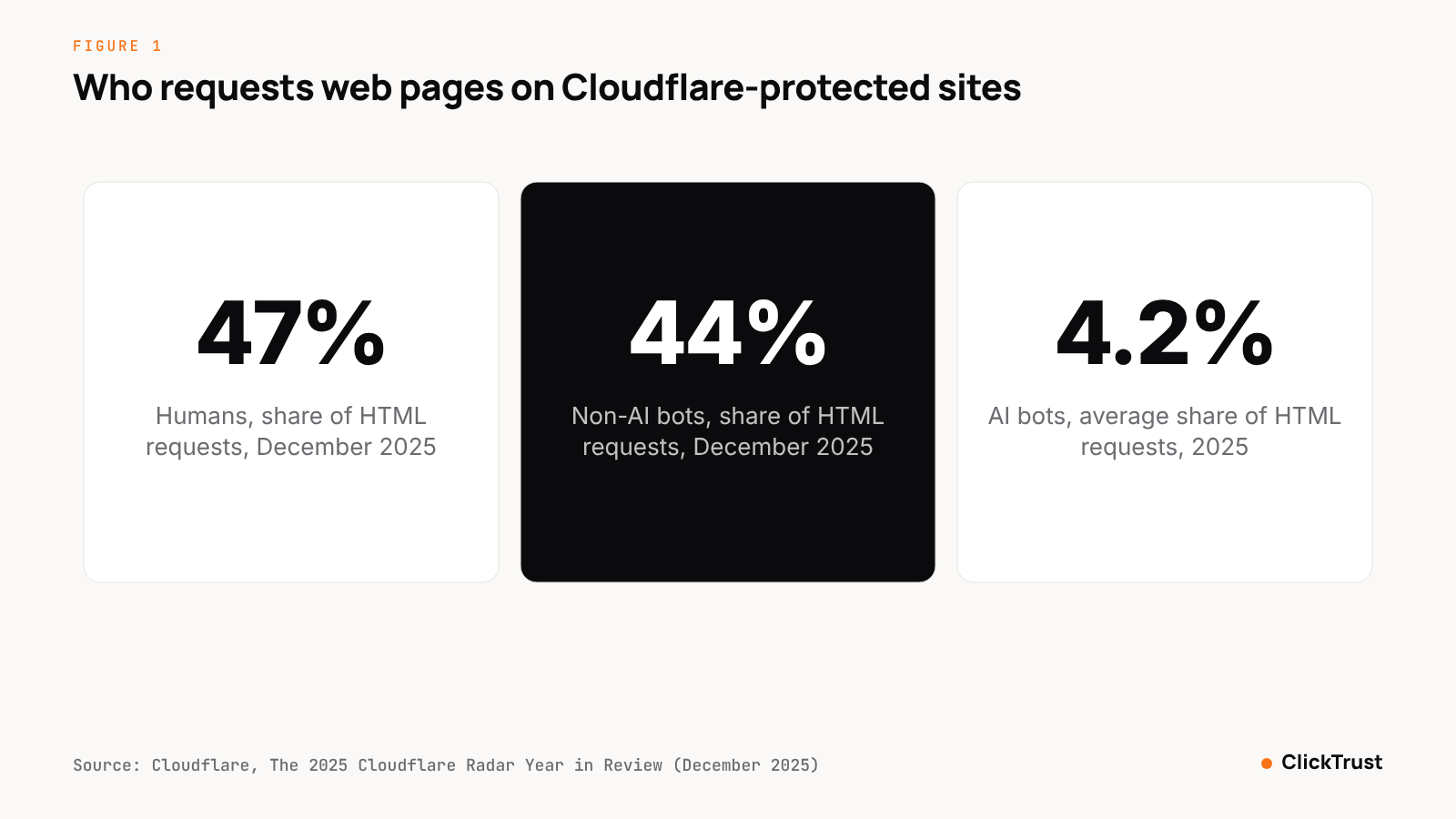 Figure 1. Humans made less than half of HTML requests on Cloudflare-protected sites by December 2025; AI bots were a small share. Source: Cloudflare, The 2025 Cloudflare Radar Year in Review.
9. More conversions than clicks, and poor-quality form fills
Two signals come straight from Google's wording. First, Google says that "In rare cases, your reports might show more conversions than clicks" when a converting click is later marked invalid (Google, Invalid clicks: Definition). If you see it often, invalid traffic is reaching your conversion tracking. Second, the Click Quality Form covers "poor-quality form submissions" alongside invalid clicks (Google, About the Invalid Activity Credit Report). A run of leads with fake names, disposable email domains or identical form timing is a click-fraud signal, not only a sales problem. Google said its systems cut advertiser exposure to invalid leads by an average of 30% so far in 2026 (Google, We're introducing a new transparency tool for invalid traffic in Google Ads), which still leaves the rest to you.
How to run a click fraud audit in Google Ads: 8 steps
- Pick a 30-day window and export campaign, ad group, placement, hour-of-day, location and device reports from Google Ads, with the invalid clicks and invalid click rate columns added and the Invalid Activity Credit Report alongside.
- Export the matching paid sessions from your analytics, with landing page, session duration, bounce and conversion events, and reconcile clicks against sessions.
- Pull your web server logs for the same window and list the top IP addresses by paid landing-page hits, flagging data-center ranges and repeat visitors.
- Rank placements by clicks and mark any with a bounce rate above 90%, an average session under two seconds, or zero conversions on meaningful spend.
- Compare hour-of-day click share against hour-of-day conversion share, and do the same for location and device, noting any segment where the shares diverge.
- Separate Performance Max and AI Max results from standard Search, and compare invalid click rates and click-to-session ratios between them.
- Add exclusions: IP addresses, placements, locations and, where possible, audiences, then log every exclusion with the evidence behind it.
- Re-measure after one billing cycle and keep the before-and-after figures. They become the core of any refund request, which the refund checklist walks through.
When do you need a detection tool?
You need a tool when the fraud is sophisticated, the spend is large, or you need evidence a platform will accept. The manual checks above catch what the MRC calls general invalid traffic: declared bots, non-browser user agents and known data-center ranges. They miss sophisticated invalid traffic, which the MRC defines as traffic "identified through advanced analytics, multipoint corroboration, human intervention—such as hijacked devices, ad tags, or creative; adware; malware; misappropriated content" (Media Rating Council, Invalid Traffic Detection and Filtration Guidelines Addendum). The GIVT vs SIVT explainer covers the distinction.
The traffic built to look human is growing. Imperva's Bad Bot Report 2026 found bots were more than 53% of all web traffic in 2025, that 40% of bot traffic was malicious, and that AI-driven bot attacks grew 12.5 times year over year (Imperva, Bad Bot Report 2026). Google's enforcement runs at a matching scale: over 8.3 billion ads blocked or removed in 2025, 24.9 million advertiser accounts suspended, and more than 1.29 billion ads removed for Abusing the Ad Network, its largest category (Google, 2025 Ads Safety Report).
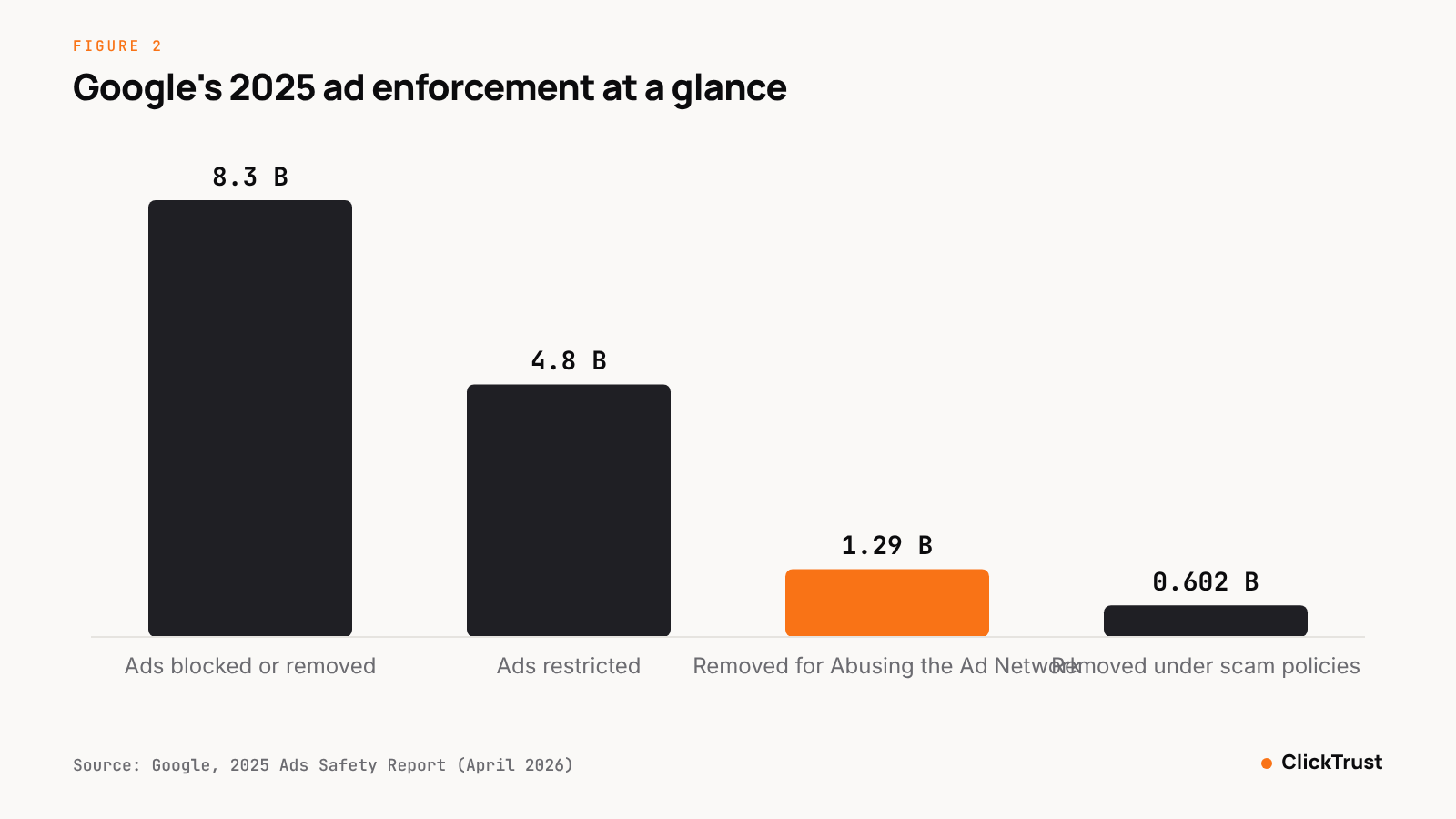 Figure 2. Google's 2025 enforcement in billions of ads; Abusing the Ad Network was the largest policy category. Source: Google, 2025 Ads Safety Report.
If your spend makes a few percent of waste material, or your manual exclusions keep growing without the problem shrinking, test a tool in monitor-only mode for a month and compare.
How ClickTrust helps
ClickTrust's Web Protection layer places a JavaScript tag on your landing pages and runs 320 detection traps against every event, each labeled GIVT or SIVT in line with MRC guidance. Each event is scored in under 50 milliseconds and receives a Traffic Quality Index (TQI). IP and audience exclusions are pushed to Google Ads, Meta and Bing automatically, and refund-ready evidence packs collect the IP lists, timestamps and placements a claim needs.
It is free to start, and Traffic Rx gives you a free landing-page traffic diagnosis before you install anything.
Sources
- TAG, US Ad Industry Extends Success in Fight Against Fraud with Fourth Straight Year of Sub-1% IVT in TAG Certified Channels (October 29, 2024), https://www.tagtoday.net/pressreleases/us-ad-industry-extends-success-in-fight-against-fraud-with-fourth-straight-year-of-sub-1-ivt-in-tag-certified-channels
- TAG, 2025 European Ad Fraud Savings Report (2025), https://ppc.land/content/files/2025/06/2025_TAG_EuropeanFraudSavingsReport-Final-compressed.pdf
- Google, Invalid clicks: Definition, Google Ads Help (undated, fetched November 2026), https://support.google.com/google-ads/answer/42995
- Google, About invalid traffic, Google Ads Help (undated, fetched November 2026), https://support.google.com/google-ads/answer/11182074?hl=en
- Google, We're introducing a new transparency tool for invalid traffic in Google Ads (November 12, 2026), https://blog.google/products/ads-commerce/invalid-traffic-overview-google-ads/
- Google, About the Invalid Activity Credit Report, Google Ads Help (2026), https://support.google.com/google-ads/answer/16826168?hl=en
- Microsoft, Microsoft Invest: Traffic Quality (updated March 3, 2025), https://learn.microsoft.com/xandr/invest/traffic-quality
- TAG, 2025 TAG Analysis Shows Ad Industry Progress in Fighting Fraud, Sharing Threats and Improving Transparency (February 3, 2026), https://www.tagtoday.net/pressreleases/2025-tag-analysis-shows-ad-industry-progress-in-fighting-fraud-sharing-threats-and-improving-transparency
- Cloudflare, The 2025 Cloudflare Radar Year in Review (December 2025), https://blog.cloudflare.com/radar-2025-year-in-review/
- Google, 2025 Ads Safety Report (April 2026), https://services.google.com/fh/files/blogs/global_2025_adssafetyreport.pdf
- Media Rating Council, Media Rating Council (MRC) Issues Final Version Of Invalid Traffic Detection And Filtration Guidelines Addendum (October 27, 2015), https://prnewswire.com/news-releases/media-rating-council-mrc-issues-final-version-of-invalid-traffic-detection-and-filtration-guidelines-addendum-300166843.html
- Imperva, Bad Bot Report 2026: Bots in the Agentic Age (April 2026), https://www.imperva.com/blog/bad-bot-report-2026-bots-agentic-age/
Frequently asked questions
How do I know if my Google Ads are getting fake clicks?
Look for a clickthrough rate that rises while conversions stay flat, repeated IP addresses or data-center ranges in your server logs, clicks at hours your customers do not browse, locations outside your targeting, and sessions that bounce within a second. Google's own Click Quality Form names clicks outside location targeting and sudden short-term cost increases as grounds for an investigation, so start with those two.
Does Google Ads show invalid clicks?
Yes. Google Ads reports the invalid clicks and invalid click rate it has already filtered, and its Invalid traffic card shows Estimated savings from automated protections and Credited cost for past invalid activity found after billing. The Invalid Activity Credit Report breaks credits down by campaign and network. These figures cover what Google caught, not the clicks its filters missed.
Can Google Ads IP exclusions stop click fraud?
IP exclusions stop repeat offenders from fixed addresses, which makes them useful against a competitor or a single data center. They do little against bots that rotate addresses, residential proxies or click farms using real phones. Treat them as one layer, updated often, alongside placement exclusions, location targeting and a detection tool that scores each click.
Is Performance Max more exposed to click fraud?
Performance Max buys Search, Display, YouTube, Gmail and Discover inventory automatically, and you cannot exclude placements one by one as you can in a standard Display campaign. Google's definition of accidental invalid clicks points to poor ad placement, which is more common on display and video inventory. Watch asset-group reports and conversion quality rather than headline cost per conversion, and compare its invalid click rate with your Search campaigns.
When do I need a click fraud detection tool for Google Ads?
When manual checks find a problem you cannot fix with exclusions, when your spend is large enough that even a few percent matters, or when you need evidence Google can match to its own definitions. Manual checks catch what the MRC calls general invalid traffic, which lists identify. Sophisticated invalid traffic mimics humans, and finding it needs behavioral scoring of each click and a log you can submit within Google's 60-day window.