Google Ads Invalid Clicks Refund: Step-by-Step Checklist (2026)
ClickTrust Research · · 10 min read · google ads · invalid clicks · refund · click quality form · click fraud
TL;DR A Google Ads invalid clicks refund is a credit Google issues for invalid activity it detects after billing, and you can ask for a review of the last 60 days through the Click Quality Form. Google says you won't be charged for invalid clicks it detects, so your request has to show the clicks its filters missed, with IP addresses, timestamps, user agents, placements and the conversion gap.

Key takeaways
- Google Ads Help states that you won't be charged for invalid clicks or impressions, and that activity detected after billing is credited on your next invoice where appropriate and possible.
- The Click Quality Form covers invalid clicks, poor-quality form submissions, clicks outside location targeting and sudden short-term cost increases, for activity within the last 60 days.
- The Invalid traffic card shows Estimated savings from automated protections and Credited cost for past invalid activity detected after the billing period ended.
- The Invalid Activity Credit Report in Report Editor breaks credits down by campaign and network, with Credited clicks, Credited amount and Adjusted cost columns.
- Google says it blocked over 99% of policy-violating ads before they served in 2025 and cut advertiser exposure to invalid leads by an average of 30% so far in 2026, so your request must show what its filters missed.
- A request with per-click evidence, MRC labels and a measured conversion gap is the only form Google can verify against its own definitions.
A Google Ads invalid clicks refund is a credit Google issues as a billing adjustment for invalid activity it confirms after you were charged, and you can request a review of the last 60 days through the Click Quality Form. Google already filters a great deal of invalid traffic before billing. Your request has to show the clicks its filters missed, and it has to show them with evidence.
This guide covers what Google's policy says, what its reports show, what you can ask it to investigate, what evidence to collect, how to file, and what to expect. The final section is the checklist itself.
What does Google's invalid activity policy actually say?
Start with the definition. Google Ads Help states: "Invalid clicks are clicks on your ads that don't represent a genuine interest in your business." It lists three types: "Accidental clicks" from poor ad placement, "Automated traffic" from bots or deceptive software, and "Manual clicks" that raise your costs or inflate publisher profits. On billing, the page is direct: "You won't be charged for invalid clicks or impressions." Clicks identified as invalid are filtered from campaign metrics and removed from billing, and if you were billed before detection you receive "a credit on your next invoice where appropriate and possible" (Google, Invalid clicks: Definition, Google Ads Help).
For traffic caught later, the invalid traffic page says "you'll receive credits in the form of a billing adjustment for the value of the invalid activity", and to request a review, "use the Click Quality Form" (Google, About invalid traffic, Google Ads Help).
If a competitor is the source, there is a policy to cite. Google's advertising policies state that "Using the Google Network to gain an unfair traffic advantage over other participants in the auction is not allowed" (Google, Abusing the ad network, Advertising Policies Help).
Google publishes neither its miss rate nor approval rates for Click Quality Form requests. Your evidence has to fill that gap.
What does the Invalid traffic card show?
On November 12, 2026, Google introduced an Invalid Traffic Overview Card in Google Ads. In the announcement, Keerat Sharma, VP of Ads Privacy and Safety, wrote: "We don't charge for invalid traffic." Google also said it had cut advertiser exposure to invalid leads by an average of 30% so far in 2026 (Google, We're introducing a new transparency tool for invalid traffic in Google Ads).
Google Ads Help defines the card's two metrics. "Estimated savings: The estimated cost saved by automated protections from invalid traffic", which covers automated filters plus proactive manual reviews. "Credited cost: The amount credited back to you for past invalid activity detected after the billing period ended." The same page says investigation requests cover "activity within the last 60 days" and "typically take several business days" (Google, About invalid traffic, Google Ads Help).
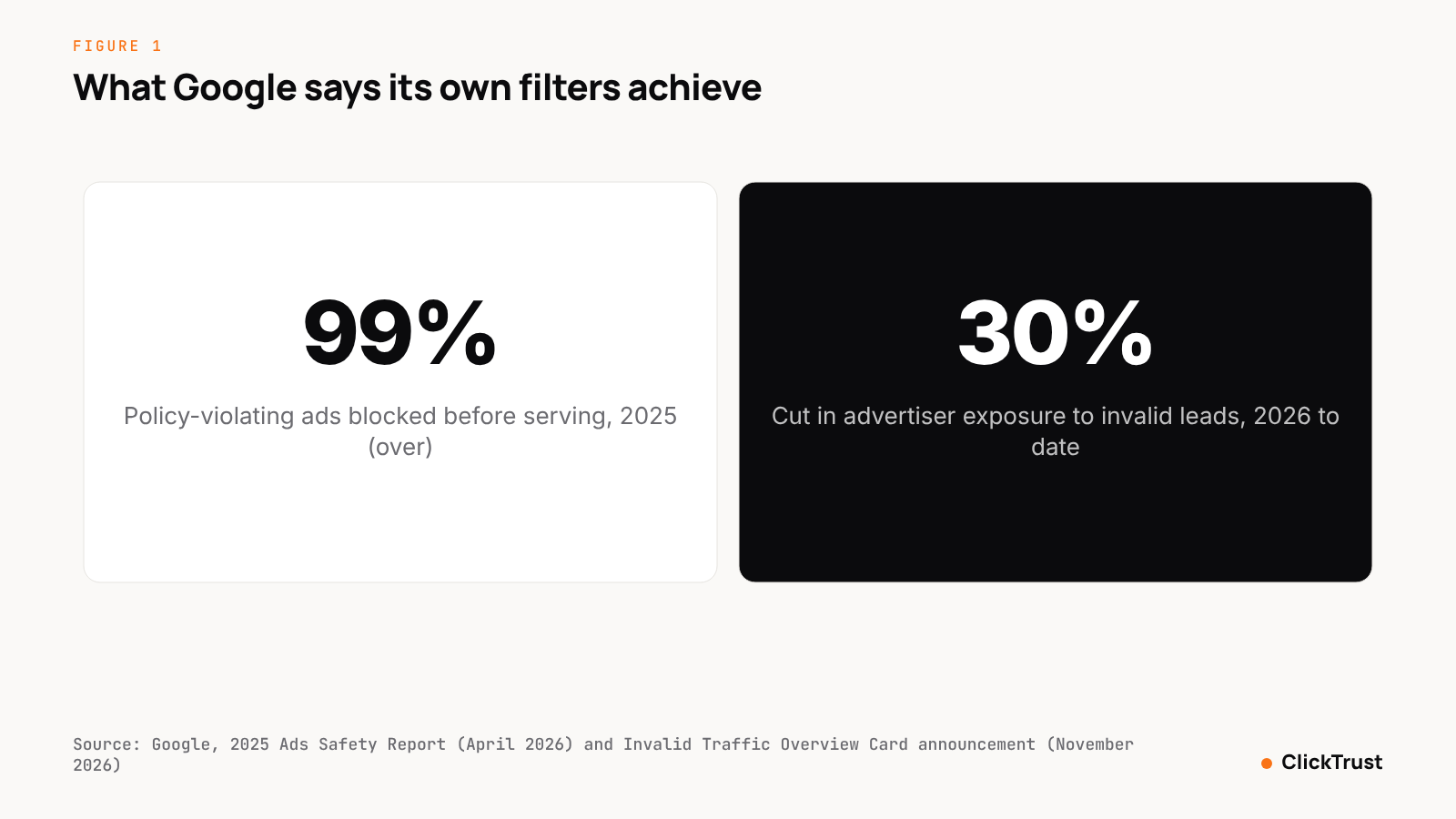 Figure 1. Google reports that over 99% of policy-violating ads were blocked before serving in 2025 and that advertiser exposure to invalid leads fell 30% on average in 2026. Source: Google, 2025 Ads Safety Report and Invalid Traffic Overview Card announcement.
Use the card as your baseline, not your conclusion. It shows the invalid traffic Google found; a refund request is about the traffic it did not find. The Credited cost it reports is already on your invoice, so do not request it again.
What does the Invalid Activity Credit Report show?
For campaign-level detail, open Report Editor, go to the template gallery and run the Invalid Activity Credit Report. Google defines its columns: "Credited clicks: The number of clicks that you received an invalid activity credit for after the billing period ended"; "Credited amount: The amount credited back to you for invalid activity detected after the billing period ended"; and "Adjusted cost: Your invoiced campaign cost minus the invalid activity credit." The report "breaks these credits down by campaign and network" (Google, About the Invalid Activity Credit Report, Google Ads Help). Use it to exclude already-credited campaigns from your submission.
What can you ask Google to investigate?
The Click Quality Form is wider than its name. Google says you can request an investigation for "invalid clicks, poor-quality form submissions, clicks outside location targeting, or sudden short-term cost increases" (Google, About the Invalid Activity Credit Report). Each category calls for different evidence.
| Category Google names | What to show | Where it comes from |
|---|---|---|
| Invalid clicks | Repeated IPs, data-center ranges, non-browser user agents, click bursts, zero sessions or conversions | Server logs, analytics, hour-of-day and device reports |
| Poor-quality form submissions | Fake names, disposable email domains, identical submission timing, uncontactable leads | CRM, form logs, lead-scoring notes |
| Clicks outside location targeting | Clicks from excluded countries or regions, location and language mismatches | User locations report, server logs |
| Sudden short-term cost increases | Daily cost and click charts with the spike marked, conversion rate over the same days | Campaign and ad-group reports |
What evidence should you collect?
Collect everything Google cannot see from its side of the click: what happened on your landing page, where invalid clicks reveal themselves. Gather these five sets.
IP lists
From your server logs or a tracking script, list the IP addresses behind paid clicks in the period. Flag addresses that repeat beyond what your audience would explain, ranges that belong to data centers or hosting providers, and addresses that match known proxy services. TAG's Data Center IP list grew to nearly 68 million IP addresses in 2025 (TAG, 2025 TAG Analysis Shows Ad Industry Progress in Fighting Fraud). Google Ads does not expose IP addresses.
Timestamps
Export click timestamps and look for bursts: dozens of clicks within a minute, regular intervals no human produces, and activity while your market is asleep. Line them up against analytics sessions to show which clicks never produced one.
User agents
Record the user-agent string for each paid landing-page hit. Flag non-browser agents, headless browser signatures, outdated browser versions that appear far more often than their market share, and agents that change between requests from the same address.
Placements
For Display, Video Partners, Search Partners and Performance Max traffic, pull the placement report and rank by clicks. Mark placements with a bounce rate above 90%, average sessions under two seconds, or zero conversions on meaningful spend. The Google supply page explains how these inventory types differ.
Conversion gaps
For the flagged set and the clean set over the same dates, tabulate clicks, sessions, conversions and cost. A flagged set with 3,000 clicks, 900 sessions and zero conversions beside a clean set with normal ratios is the most persuasive exhibit you can submit.
Label each flagged click in MRC terms while the data is open: General Invalid Traffic (GIVT) for list-based matches such as data-center ranges and declared bot user agents, Sophisticated Invalid Traffic (SIVT) for behavioral matches such as impossible timing. The GIVT vs SIVT explainer has the definitions, and the detection guide covers the nine signals behind the flags.
How do you file a Google Ads invalid clicks refund request?
- Fix the window. Google reviews activity within the last 60 days, so set your analysis period inside it and note the deadline for the earliest date.
- Add the invalid click columns to your campaign reports, run the Invalid Activity Credit Report, and screenshot the Invalid traffic card to show what Google has already credited.
- Build the evidence file: IP list, timestamps, user agents, placements and the conversion-gap table, with each flagged click labeled GIVT or SIVT.
- Apply exclusions in Google Ads for the flagged IP addresses, placements and locations before you file. It shows you have acted and stops the bill growing during the review.
- Write a one-page summary: campaigns affected, date range, which of Google's four categories applies, flagged clicks and their cost, the pattern and the conversion gap. Plain language, no accusations.
- Submit through the Click Quality Form with the summary and the evidence file, referencing campaigns and dates exactly as they appear in your account.
- Record the submission date and contents. Reconcile any credit against your flagged cost in the Invalid Activity Credit Report; if refused, keep the file for next time.
- Re-measure the following billing cycle with the same method, and file again if the pattern persists. A standing monthly process beats a one-off claim.
What should you realistically expect?
Expect a partial credit at best, and expect Google to hold its own detection as the standard. What it publishes is the scale of its enforcement: in 2025 it blocked or removed over 8.3 billion ads and suspended 24.9 million advertiser accounts, and says its systems caught over 99% of policy-violating ads before they served (Google, 2025 Ads Safety Report).
The limit is what no filter sees. Every Google statement above covers invalid traffic it detects, and no platform publishes a miss rate. The best public measure of the gap is TAG's 2025 European Ad Fraud Savings Report, which estimated 10.36% invalid traffic in unfiltered video and display channels in 2023, against about 1% in protected channels, and put the likely loss in unprotected channels at €1.19 billion (TAG, 2025 European Ad Fraud Savings Report).
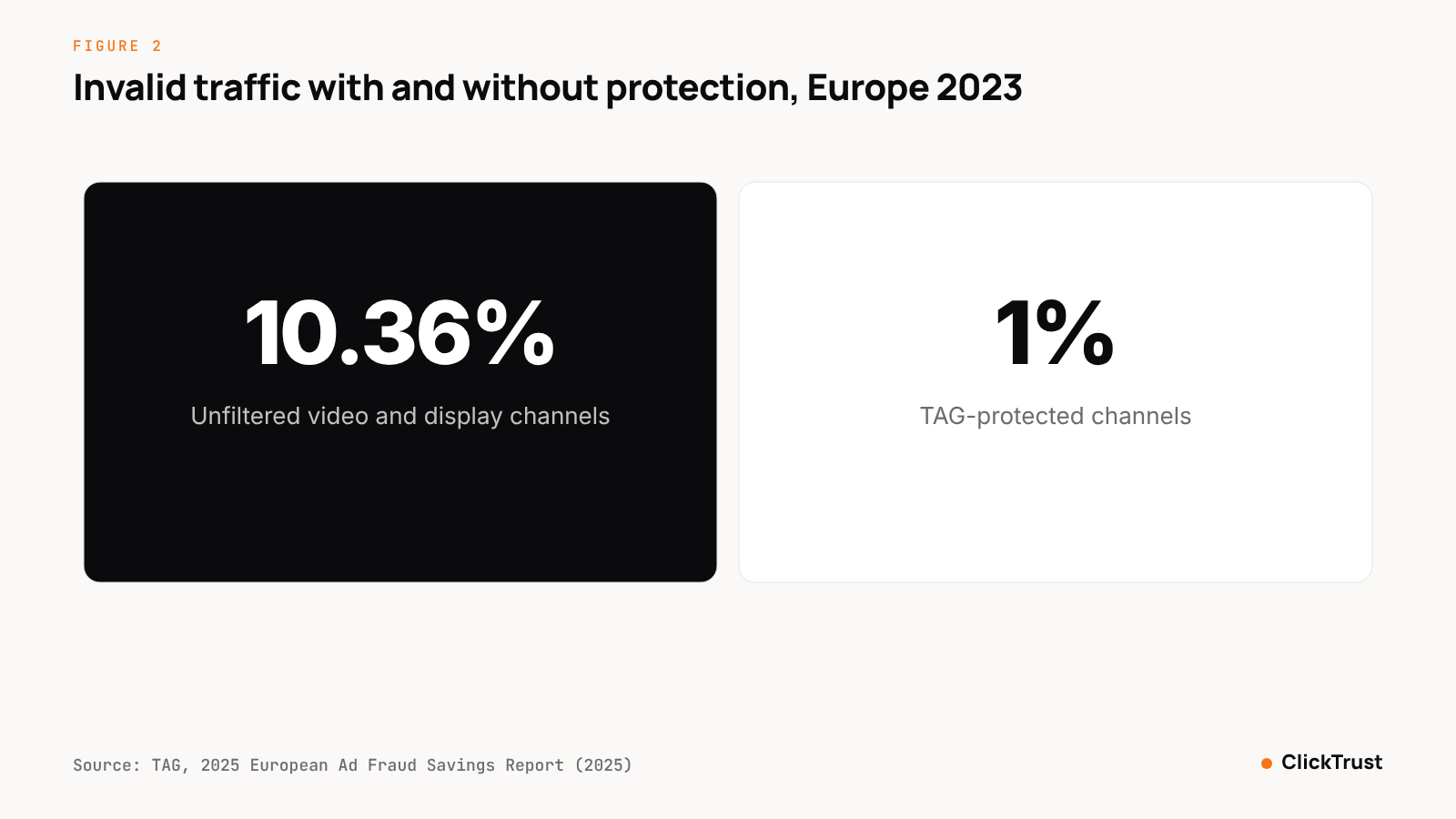 Figure 2. Unfiltered channels carried about ten times the invalid traffic of TAG-protected channels in 2023. Source: TAG, 2025 European Ad Fraud Savings Report.
Within that gap, the MRC's two tiers tell you where the credit lies. GIVT should already have been filtered, so any of it on your bill is a clear-cut request. SIVT, which the MRC says needs "advanced analytics, multipoint corroboration, human intervention" to identify (Media Rating Council, Invalid Traffic Detection and Filtration Guidelines Addendum), is where a well-evidenced request earns a credit and a vague one earns a form letter. ClickTrust audits find 14 to 42 percent of paid traffic is invalid depending on channel.
Three practical expectations follow. A credit arrives as a billing adjustment, not cash. Monthly requests with consistent methodology do better than one large claim. And the exclusions you apply often save more than the credit itself, because they stop the next 60 days from looking like the last 60.
The checklist
Work through this list before every submission.
- The analysis period falls inside Google's 60-day review window, and the deadline for the earliest date is noted.
- Invalid click columns are added, the Invalid Activity Credit Report is run, and the Invalid traffic card is captured.
- The request is matched to one of Google's four categories: invalid clicks, poor-quality form submissions, clicks outside location targeting, or short-term cost increases.
- The IP list is exported from server logs, with repeats, data-center ranges and proxy matches flagged.
- Timestamps are exported, with bursts, regular intervals and off-hours clusters marked.
- User agents are recorded, with non-browser, headless and anomalous versions flagged.
- The placement report is ranked by clicks, with high-bounce, short-session and zero-conversion placements marked.
- The conversion-gap table compares flagged against clean clicks on the same dates.
- Each flagged click carries a GIVT or SIVT label with the signal behind it.
- Exclusions for flagged IP addresses, placements and locations are live in Google Ads.
- The one-page summary references campaigns and dates exactly.
- The submission is filed through the Click Quality Form, logged, and a re-measurement date is set.
How ClickTrust helps
ClickTrust produces refund-ready evidence packs as a standard output. Its Web Protection layer places a JavaScript tag on your landing pages, runs 320 detection traps against every event, labels each GIVT or SIVT in line with MRC invalid-traffic guidance, and scores it in under 50 milliseconds with a Traffic Quality Index (TQI). IP and audience exclusions are pushed to Google Ads, Meta and Bing automatically, so step 10 of the checklist happens without a spreadsheet.
It is free to start. To see how much of your current Google Ads traffic would be flagged before you file anything, start with a fraud evaluation.
Sources
- Google, Invalid clicks: Definition, Google Ads Help (undated, fetched November 2026), https://support.google.com/google-ads/answer/42995
- Google, About invalid traffic, Google Ads Help (undated, fetched November 2026), https://support.google.com/google-ads/answer/2549113
- Google, Abusing the ad network, Advertising Policies Help (undated), https://support.google.com/adspolicy/answer/6020954
- Google, We're introducing a new transparency tool for invalid traffic in Google Ads (November 12, 2026), https://blog.google/products/ads-commerce/invalid-traffic-overview-google-ads/
- Google, About invalid traffic, Google Ads Help (undated, fetched November 2026), https://support.google.com/google-ads/answer/11182074?hl=en
- Google, About the Invalid Activity Credit Report, Google Ads Help (2026), https://support.google.com/google-ads/answer/16826168?hl=en
- TAG, 2025 TAG Analysis Shows Ad Industry Progress in Fighting Fraud, Sharing Threats and Improving Transparency (February 3, 2026), https://www.tagtoday.net/pressreleases/2025-tag-analysis-shows-ad-industry-progress-in-fighting-fraud-sharing-threats-and-improving-transparency
- Media Rating Council, Media Rating Council (MRC) Issues Final Version Of Invalid Traffic Detection And Filtration Guidelines Addendum (October 27, 2015), https://prnewswire.com/news-releases/media-rating-council-mrc-issues-final-version-of-invalid-traffic-detection-and-filtration-guidelines-addendum-300166843.html
- Google, Gemini is stopping harmful ads before people ever see them, 2025 Ads Safety Report (April 2026), https://blog.google/products/ads-commerce/2025-ads-safety-report/
- TAG, 2025 European Ad Fraud Savings Report (2025), https://ppc.land/content/files/2025/06/2025_TAG_EuropeanFraudSavingsReport-Final-compressed.pdf
Frequently asked questions
How do I get a refund for invalid clicks in Google Ads?
Collect click-level evidence for the last 60 days, including IP addresses, timestamps, user agents, placements and the conversion gap, then submit it through Google's Click Quality Form. Google Ads Help says investigations typically take several business days and, where it confirms invalid activity it did not already filter, it issues a credit as a billing adjustment. Keep a copy of everything you submit.
How far back can Google review invalid clicks?
Google Ads Help says investigation requests cover activity within the last 60 days, requested through the Click Quality Form. Clicks older than that are out of scope, however strong the evidence. If you suspect a problem, export your data at once and file within the window, then set up a standing process so the next request is ready before the window closes.
Does Google automatically refund invalid clicks?
Yes, for the invalid traffic it detects. Google says you won't be charged for invalid clicks or impressions, and that activity found after billing is credited on your next invoice where appropriate and possible, now visible as Credited cost in the Invalid traffic card. Traffic its filters miss is not refunded unless you file a request with evidence through the Click Quality Form.
What evidence does Google need for an invalid click claim?
Google's form asks for the affected campaigns, dates and a description, but the strength of the request lies in click-level detail: repeated IP addresses, timestamps showing bursts or odd hours, suspicious user agents, placements with no conversions, and a comparison of flagged against clean traffic. Labeling each click GIVT or SIVT in MRC terms helps Google's team match it to its own categories.
How much of my Google Ads spend can I expect back?
Google does not publish approval rates or typical credit sizes, and no verified figure exists. Expect credits only for clicks you can show were invalid and that Google's filters missed. Google's own wording covers detected traffic: you won't be charged for invalid clicks, and later detections are credited where appropriate and possible. The credit depends on how well your evidence proves the clicks that were never detected.